vucs.7z (567.1 KB)
Cambridge(剑桥网络版)2026离线版 · 增强脚本(vucs)
简介
这是一套配合《Cambridge(剑桥网络版)2026离线版》(mdx + mdd)使用的运行时增强脚本,由 vucs.js(脚本)与 vucs.css(样式)两个文件组成。
它不修改词典原始数据:所有功能都是在词条页面加载时动态注入的,清空缓存或移除脚本后,词典立刻恢复原样。
适用于 GoldenDict-ng、欧路词典(PC 端)与 欧路词典 Android 版(实机测试通过)。
词典文件(.mdx 及 .mdd)请到原帖下载,感谢**137229 提供的素材**。
主要功能
阅读增强
- 版本徽章:英汉双解 / 剑桥英英 / 例句 / 同义词等版本一键切换,可折叠、可隐藏
- 双语排版优化:中文释义对齐、字阶统一、护眼墨色配色
- 释义圆形数字编号、词性 / 语法标签内联
- 折叠块:Synonyms、Thesaurus、COLLOCATIONS、Idioms 等自动折叠
- 隐藏 CEFR 等级、图片来源、语料来源等干扰信息
发音
- UK 蓝色 / US 红色圆形发音按钮,点击音标即可发音
- 多通道 TTS:欧路内置 → Edge 神经语音(可换音色)→ Google → 系统语音,自动降级
- 本地缓存(5000 条上限),重复查词秒播
- 例句末尾 UK / US 小喇叭 + 「译」AI 翻译按钮
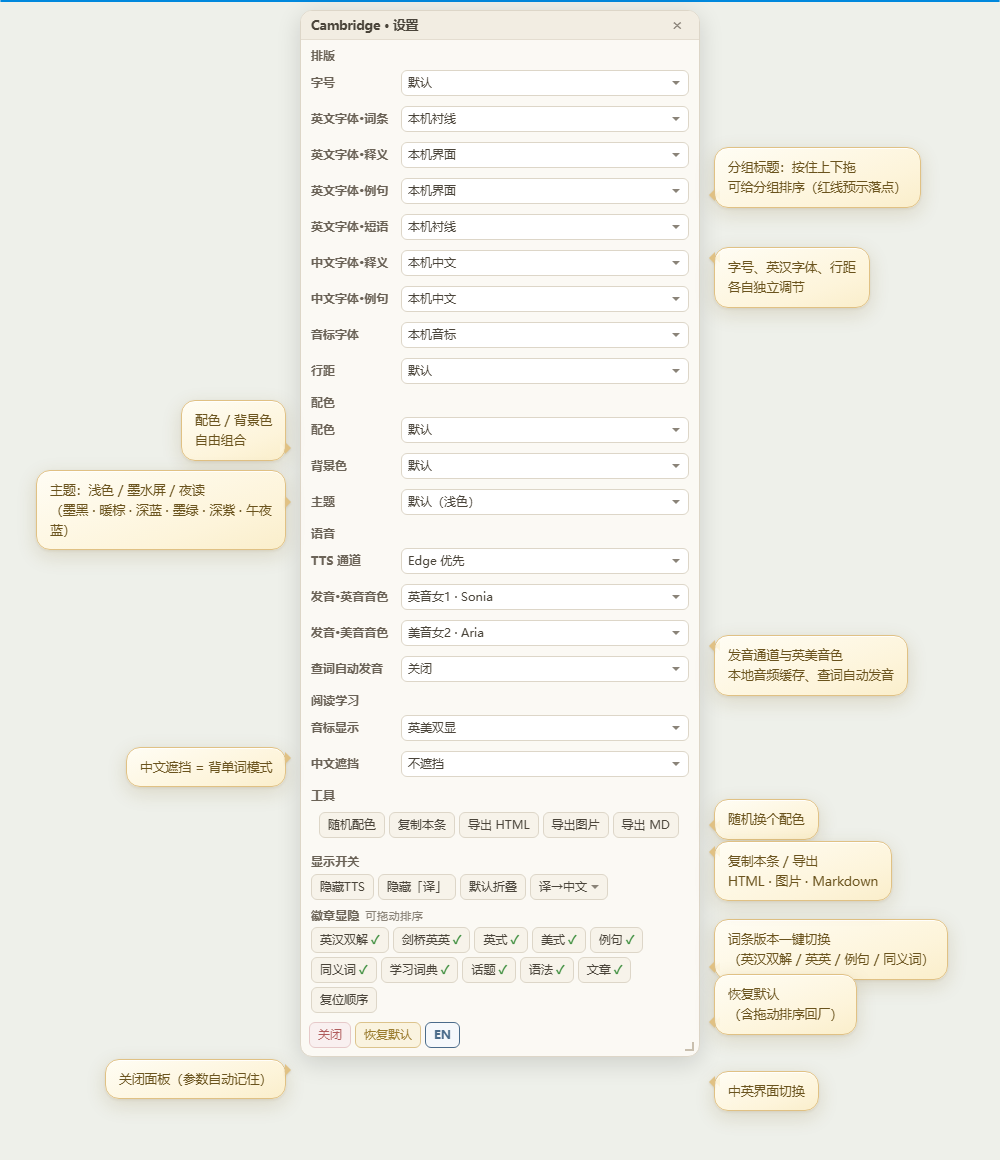
设置面板(词条右上角  齿轮图标;可左右拖动挪位置,双击复位)
- 字号缩放、英汉各部位字体、行距独立调节
- 配色 / 背景色 / 主题(含夜读模式)
- 音标显示、中文遮挡(背单词模式)、查词自动发音
- 随机配色、复制本条、导出 HTML / 图片 / Markdown
- 中英界面切换(EN 按钮)
手工排序
所有面板设置项都可以拖动排序,并有落点指示线:
- 拖动分组标题(整组移动)→ 红色横线 预示落点
- 拖动按钮(徽章显隐 / 显示开关 / 工具行)→ 绿色竖线 预示插入位置
- 「恢复默认」一键全部复位;顺序自动记忆
安装方法
- 将词典的
.mdx/.mdd与vucs.js、vucs.css放在同一目录 - GoldenDict-ng:将目录加入词典库,重启即可
- 欧路词典:导入词典后确认同目录文件存在;如样式异常请清除欧路缓存后重开词条
常见问题
- 欧路里部分新功能不生效? 欧路可能缓存了旧版样式,清除缓存或重新加载词典即可
- 发音按钮不出现? 检查 TTS 通道设置;Edge 线路需联网,系统语音离线可用
- 拖动按钮时误碰? 位移超过 6px 才算拖动,点击不受影响
性能说明
- 无轮询重活:常驻检查仅 700ms 一次的轻量探测(页面隐藏时自动跳过)
- 其余定时任务均为有界短窗口(数秒内自动停止)
- DOM 监听带 120ms 防抖;词典字号默认时不做全页扫描
声明
- 本增强脚本无版权、免费使用,可自由复制、修改、转发,无需署名
- 脚本仅供个人学习交流使用,严禁用于商业用途
- 词典内容(文本、音频、图片等)版权归 剑桥大学出版社(Cambridge University Press) 及原权利方所有,请支持正版,本资源仅供学习研究,请于下载后 24 小时内自行删除
- 因使用本脚本产生的任何问题,作者不承担责任
Cambridge Advanced English-Chinese Dictionary 2026 Offline Edition · Enhancement Script (vucs)
Introduction
This is a runtime enhancement script that works alongside the Cambridge Advanced English-Chinese Dictionary 2026 Offline Edition (mdx + mdd). It consists of two files: vucs.js (script) and vucs.css (styles).
It does not modify the dictionary’s original data: all features are injected dynamically when an entry page loads. Clear the cache or remove the script, and the dictionary instantly returns to its original state.
Works with GoldenDict-ng, Eudic (desktop), and Eudic for Android (tested on a real device).
Key Features
Reading enhancement
- Version badges: one-tap switching between English-Chinese / English-English / Examples / Thesaurus views; collapsible and hideable
- Bilingual layout optimization: aligned Chinese definitions, unified type scale, easy-on-the-eyes ink color scheme
- Circular numbers for definitions; inline part-of-speech and grammar labels
- Auto-collapsing blocks: Synonyms, Thesaurus, COLLOCATIONS, Idioms, etc.
- Hides clutter such as CEFR levels, image credits, and corpus notes
Pronunciation
- UK (blue) / US (red) round audio buttons; click any phonetic symbol to hear it
- Multi-channel TTS with automatic fallback: Eudic built-in → Edge neural voices (voice selectable) → Google → system voices
- Local cache (up to 5000 entries) for instant playback of repeated lookups
- UK / US mini speakers at the end of each example sentence, plus an AI “Translate” button
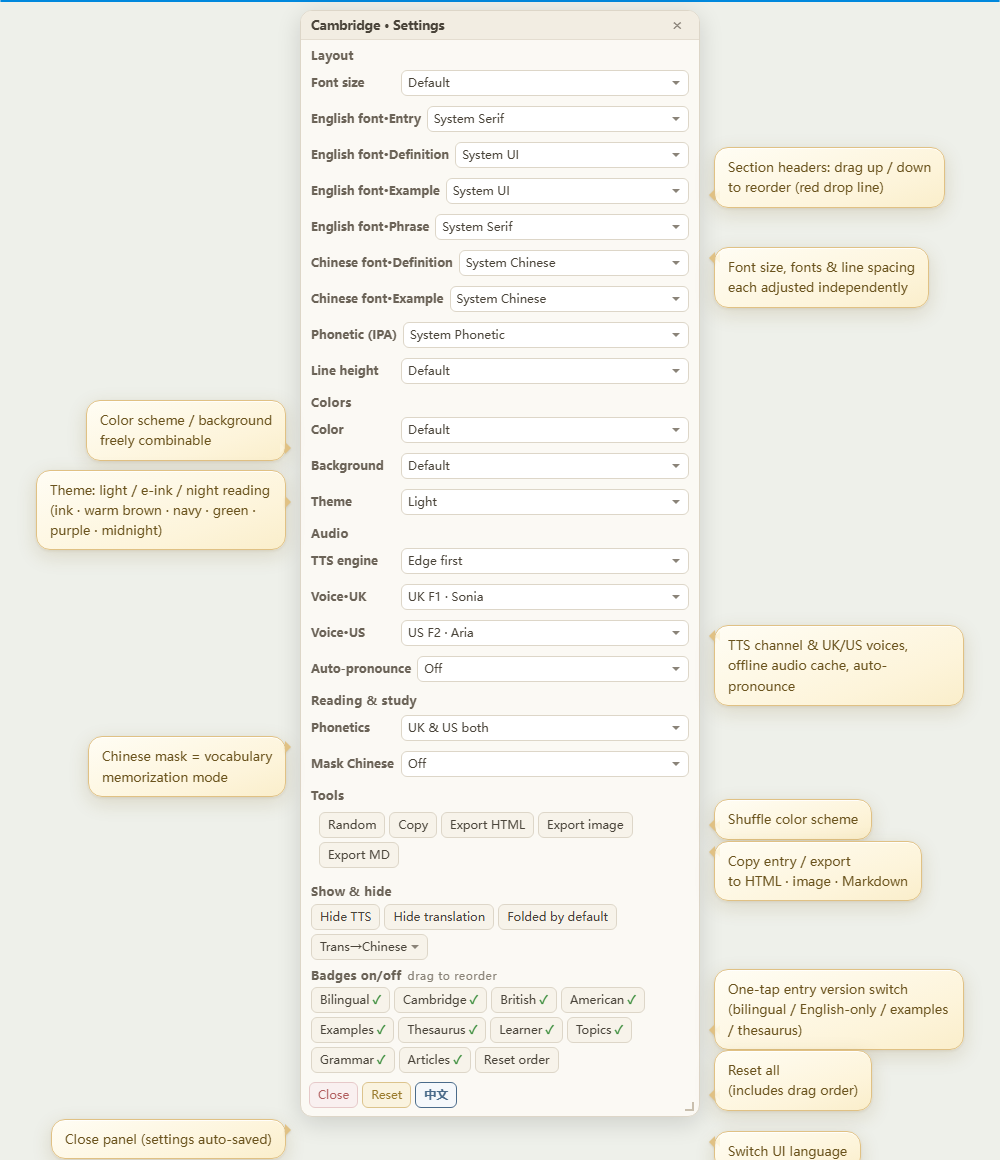
Settings panel (gear icon at the top right of the entry; drag to move, double-click to reset)
- Independent control of font size, typefaces (EN/ZH), and line height
- Colors / background / theme (including night mode)
- Phonetics display, Chinese masking (word-memorization mode), auto-pronounce on lookup
- Random color, copy entry, export as HTML / image / Markdown
- UI language toggle (Chinese / English)
Manual reordering
Every settings item can be reordered by dragging, with a drop indicator line:
- Drag a group header (moves the whole group) → a red horizontal line previews the drop position
- Drag a button (badge toggle / display switches / tools row) → a green vertical line previews the insertion point
- “Restore defaults” resets everything at once; order is remembered automatically
Installation
- Put the dictionary’s
.mdx/.mddfiles in the same folder asvucs.jsandvucs.css - GoldenDict-ng: add the folder to your dictionary library and restart
- Eudic: after importing the dictionary, make sure the same-folder files are present; if styles look wrong, clear Eudic’s cache and reopen the entry
FAQ
- Some new features not working in Eudic? Eudic may have cached an older stylesheet — clear its cache or reload the dictionary
- No audio buttons? Check the TTS channel settings; the Edge voice needs an internet connection, system voices work offline
- Accidental drags? A drag only registers after 6px of movement, so normal clicks are unaffected
Performance
- No heavy polling: the only always-on check is a lightweight probe every 700ms (skipped automatically when the page is hidden)
- All other timers are short, bounded windows (they stop by themselves within seconds)
- DOM observers are debounced at 120ms; no full-page scanning when font size is left at default
Disclaimer
- This enhancement script is copyright-free and free to use. You may copy, modify, and redistribute it freely, no attribution required
- The script is for personal study and exchange only. Commercial use is strictly prohibited
- All dictionary content (text, audio, images, etc.) is the property of Cambridge University Press and the original rights holders. Please support official releases. This resource is for study and research only; please delete it within 24 hours of downloading
- The author assumes no liability for any issues arising from the use of this script