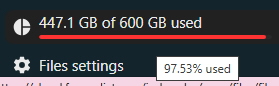
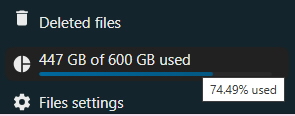
For some time now I have been seeing a red line on the free space indicator for the directory, but I was working easy, because it said above that we have over 150 gigabytes free before we reach our limit. Today a message appeared in the notifications that we are using over 96 percent of the limit, and then I hovered the mouse over the indicator itself, not paying attention to the writing above it. And the following image appeared:
Can you check what the problem is? Thanks in advance!
Sometimes the upload is terribly slow, but this has been the case for a long time and it seems to only be when the server is overloaded. Otherwise I have no other problems. The NextCloud sync program has also not been working for me for a long time and I upload via browser/HTTPS. By the way, it is now showing this:
Thanks for sharing this excellent dictionaries storage!
I encountered an essential issue with an English → Hebrew dictionary which I have managed to fix using a small Python script I wrote. This issue is covered in more details here and here (same issue, different formats):
I’d like to send the maintainers of this cloud storage a fixed version of this dictionary. How can I do that?
Attach it here or send it to me in a private message. I may not be here until the end of the day - I’m leaving soon, but I’ll add them to the cloud a little bit later.
I have to disagree - the Apple dictionary works. The file in this folder that you point to is just a link, as it is bidirectional and it makes no sense to repeat the same file in both folders. For the dictionary archive, see here:
The other dictionaries can also be easily converted to StarDict.
Archive is OK, just checked with two different archivers (from cloud too). Change your archiver. Another option: download from Apple’s site and convert self to StarDict or another format using pyGlossary (fork here).