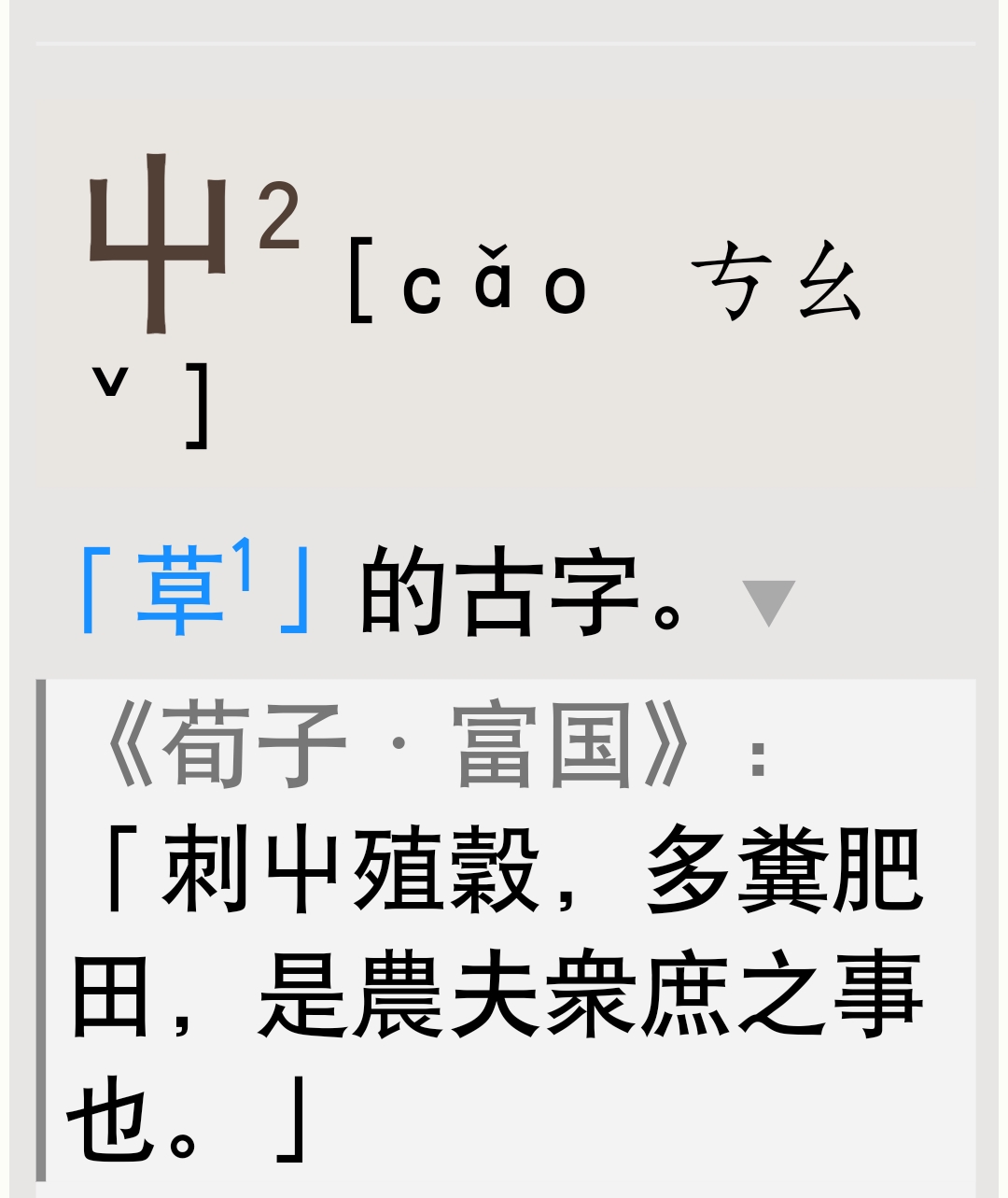
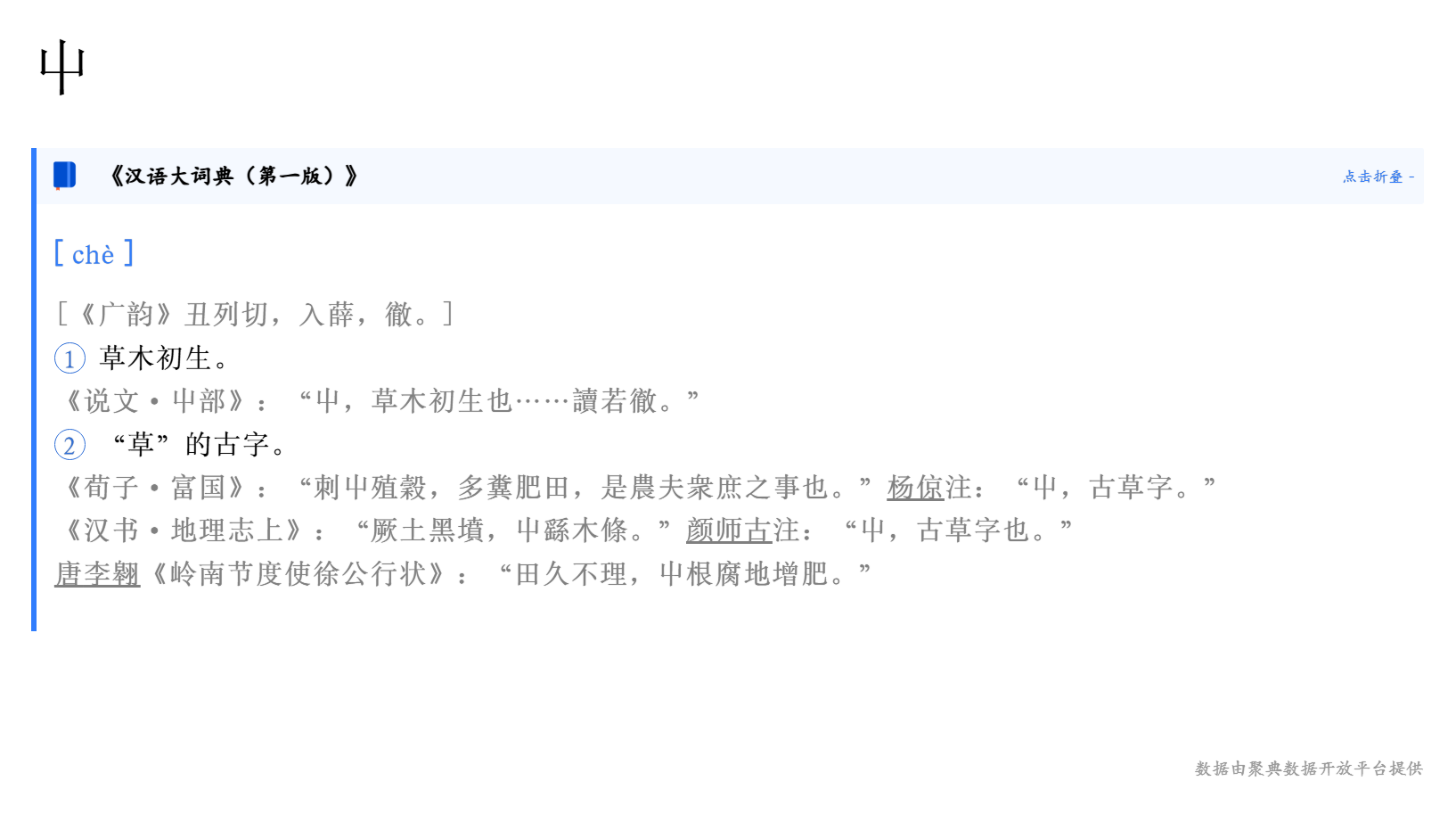
切词适合在词条搞全且知道词条所在位置的前提下进行,现在还不到时候。
汉大的电子版主要有三个来源:一是光盘,知网和汉大官网数据都是它的后继,pua是知网体系;二是聚典,抖音、搜狗、辞海、古籍、总汇用的都是它的数据,抖音用的是json数据,其它网站用的是xml数据,它们的pua是另外一个体系;三是方正,它好像就是ocr后粗校而成。
光盘数据由于当时字体的限制,少了很多生僻字以及相关的例证和词条,但也补进了一些书上没有的字或者词(?),是非常重要的参考资料。
聚典xml不依赖光盘,推倒重来,以纸书为准,但补入汉大订补,甚至第二版的一些内容(?),应该作为最主要的参考资料。也不知是有意还是无意,它又比纸书少了一些字词,比如“虼𧒮兒,好大面皮兒”“萊公”“萊國”“駣𩥴”“邱𡑞”等。
它还引入了一些新的问题。有些是字形问题,如“垂綫”,它用“垂线”,“五經㕑”,它用“五經厨”。有些就是错的,如“東郭㕙”,它是“東敦㕙”。但瑕不掩瑜,它仍是目前最可靠的版本,错讹最少。
已知问题,修复中
另外xml数据 还有带数字词头无法正常跳转的问题
先把图片切出来,然后在对齐不上的地方就能知道哪个区间有缺词条/词头的情况。试错,首先得去试。
当然,如果工作量太大,一个人难负其荷;那也总得有人开先河,第一个吃螃蟹,把大工作量的事情分解成可分步骤完成的。
LEON大大。关于ai自动翻译的。我看朗文6修改的K大 用的是下面格式,不知道能否嫁接上呢?主要是小白不懂还要注册,还要这些。如果有个通用的,就很完美了。
if (lm6cf.onlyChn) lm6cf.defaultShowCN = true;
//
const appid = “73c393c6”;
const apiKey = “cf9bf7b39b967beb8a33b122e8de7ae0”;
const apiSecret = “YzUxMjY3YWFkNTJkYmUwNDhhMzE0MTYz”;
const gptUrl = “wss://maas-api.cn-huabei-1.xf-yun.com/v1.1/chat”;
async function callLLM(text, tAera) {
let wsUrl = await getWebsocketUrl(apiKey, apiSecret, gptUrl);
let llmSocket = new WebSocket(wsUrl);
llmSocket.onclose = () => (llmSocket = null);
llmSocket.onopen = function () {
const requestData = {
header: { app_id: appid, uid: “1234” },
parameter: {
chat: {
domain: “xdeepseekv3”,
temperature: 0.5,
max_tokens: 4096,
},
},
payload: {
message: { text: [{ role: “user”, content: text }] },
},
};
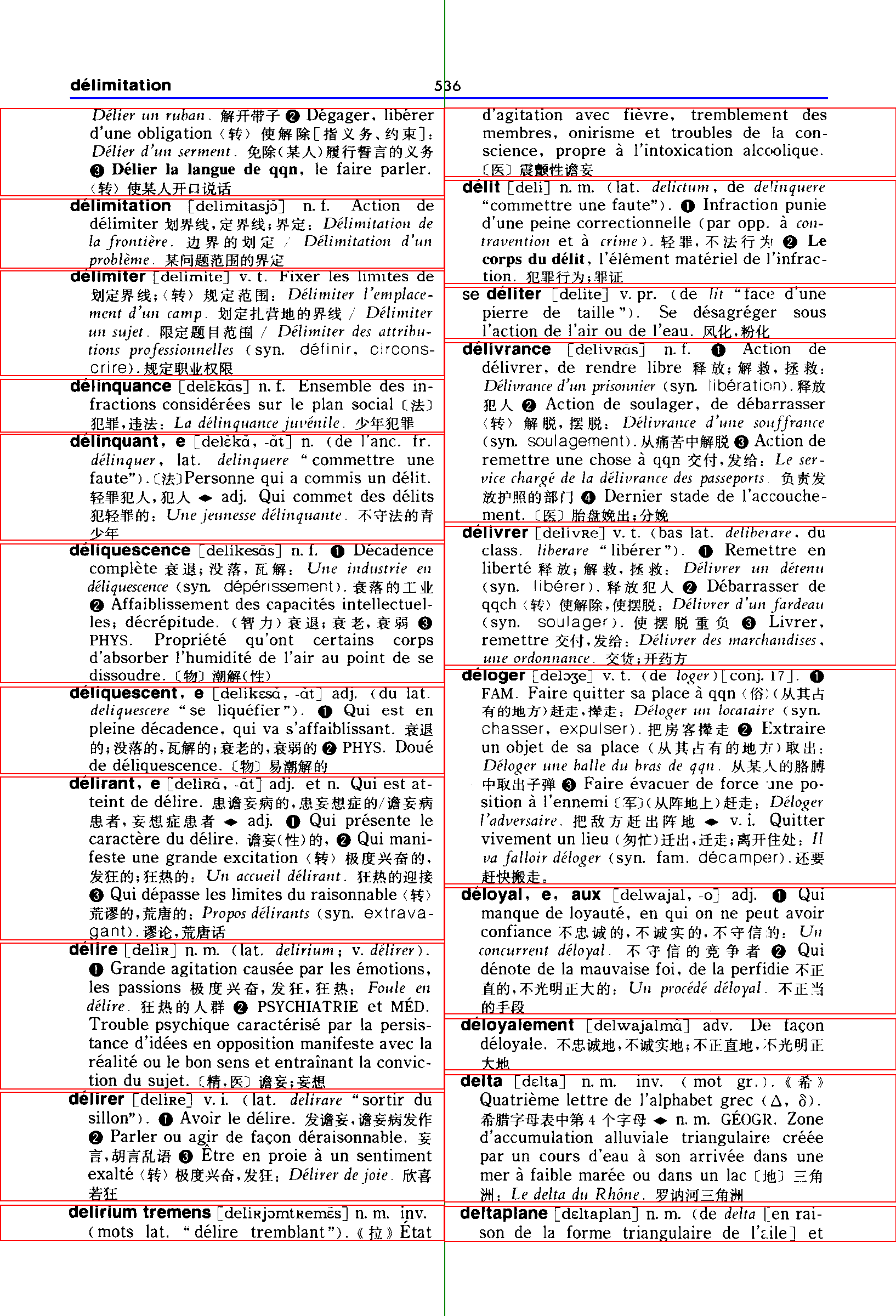
它们如今不难操作,可以用视觉ai模型提取一遍词头(《汉语大词典》的词头都在【】括号内,容易找准),像个别字认错了,也不要紧,现在有足够的其他来源的词头来校核。至于词条的坐标位置,汉大也易于确定,用opencv库或者PaddleOCR这些都行,在处理《拉鲁斯法汉双解词典》时,就用 cv2 和 sklearn 模块识别提取了词条的坐标数据。只要图像清晰,且词条特征明显,获得的坐标数据是比较准确的。
下面给一页拉鲁斯词条坐标位置的示例。
{
  "header": [
    128,
    177,
    1381,
    3
  ],
  "mid_column": 810,
  "entries": [
    {
      "column": 0,
      "coords": [
        0,
        197,
        810,
        357
      ],
      "is_headword": false
    },
    {
      "column": 0,
      "coords": [
        0,
        362,
        810,
        489
      ],
      "is_headword": true
    },
    {
      "column": 0,
      "coords": [
        0,
        493,
        810,
        685
      ],
      "is_headword": true
    },
    {
      "column": 0,
      "coords": [
        0,
        691,
        810,
        788
      ],
      "is_headword": true
    },
    {
      "column": 0,
      "coords": [
        0,
        791,
        810,
        985
      ],
      "is_headword": true
    },
    {
      "column": 0,
      "coords": [
        0,
        991,
        810,
        1245
      ],
      "is_headword": true
    },
    {
      "column": 0,
      "coords": [
        0,
        1252,
        810,
        1411
      ],
      "is_headword": true
    },
    {
      "column": 0,
      "coords": [
        0,
        1416,
        810,
        1714
      ],
      "is_headword": true
    },
    {
      "column": 0,
      "coords": [
        0,
        1719,
        810,
        1986
      ],
      "is_headword": true
    },
    {
      "column": 0,
      "coords": [
        0,
        1991,
        810,
        2190
      ],
      "is_headword": true
    },
    {
      "column": 0,
      "coords": [
        0,
        2197,
        810,
        2262
      ],
      "is_headword": true
    },
    {
      "column": 1,
      "coords": [
        810,
        196,
        1634,
        322
      ],
      "is_headword": false
    },
    {
      "column": 1,
      "coords": [
        810,
        328,
        1634,
        517
      ],
      "is_headword": true
    },
    {
      "column": 1,
      "coords": [
        810,
        523,
        1634,
        617
      ],
      "is_headword": true
    },
    {
      "column": 1,
      "coords": [
        810,
        624,
        1634,
        952
      ],
      "is_headword": true
    },
    {
      "column": 1,
      "coords": [
        810,
        959,
        1634,
        1213
      ],
      "is_headword": true
    },
    {
      "column": 1,
      "coords": [
        810,
        1220,
        1634,
        1612
      ],
      "is_headword": true
    },
    {
      "column": 1,
      "coords": [
        810,
        1618,
        1634,
        1849
      ],
      "is_headword": true
    },
    {
      "column": 1,
      "coords": [
        810,
        1857,
        1634,
        1951
      ],
      "is_headword": true
    },
    {
      "column": 1,
      "coords": [
        810,
        1959,
        1634,
        2192
      ],
      "is_headword": true
    },
    {
      "column": 1,
      "coords": [
        810,
        2199,
        1634,
        2264
      ],
      "is_headword": true
    }
  ],
  "page": 608
}
本论坛好像有人OCR过一遍汉大,全文数据准确度可疑,但如果只要词头文本的话,也是可用的,目前服务器端的专业OCR引擎识别中文正确率要高于视觉大模型。用视觉ai的好处在于可以只提取词头数据,节省大量输出token。
是的。首先是词头对齐,以方便找出缺漏或者多出的词条。
至于词头的用字是“太平天國”还是“太平天囯”之类的,则是后续阶段的工作,可能争讼永无止日。
哈哈。我尝试用 Qwen3-Max 提取汉大的词头,结果被拒绝了,它版权意识挺强。Gemini 识别繁体中文正确率不高。
修复已知问题
- xml格式数据subsense,无标签释义提取错误 (耗费大几个小时)
- xml格式,见词头内容,跳转链接生成,修复带数字跳转词头
- 补充4300余条缺失的xml数据
- 修复多音字,pua字例句tts错误
增加了。
老师好!请问,我用的是Mdict,查词条总是出现js相关语法错误:undefined。该怎么处理呢?
mdict内核过时,不支持新的js特性。没办法,除非作者主动修改js来兼容。
哦哦。现在是每次都要确认两个提示页面,才能正常看词条。是不是要改用GoldenDict呢?
别的软件都可以
好的,多谢!
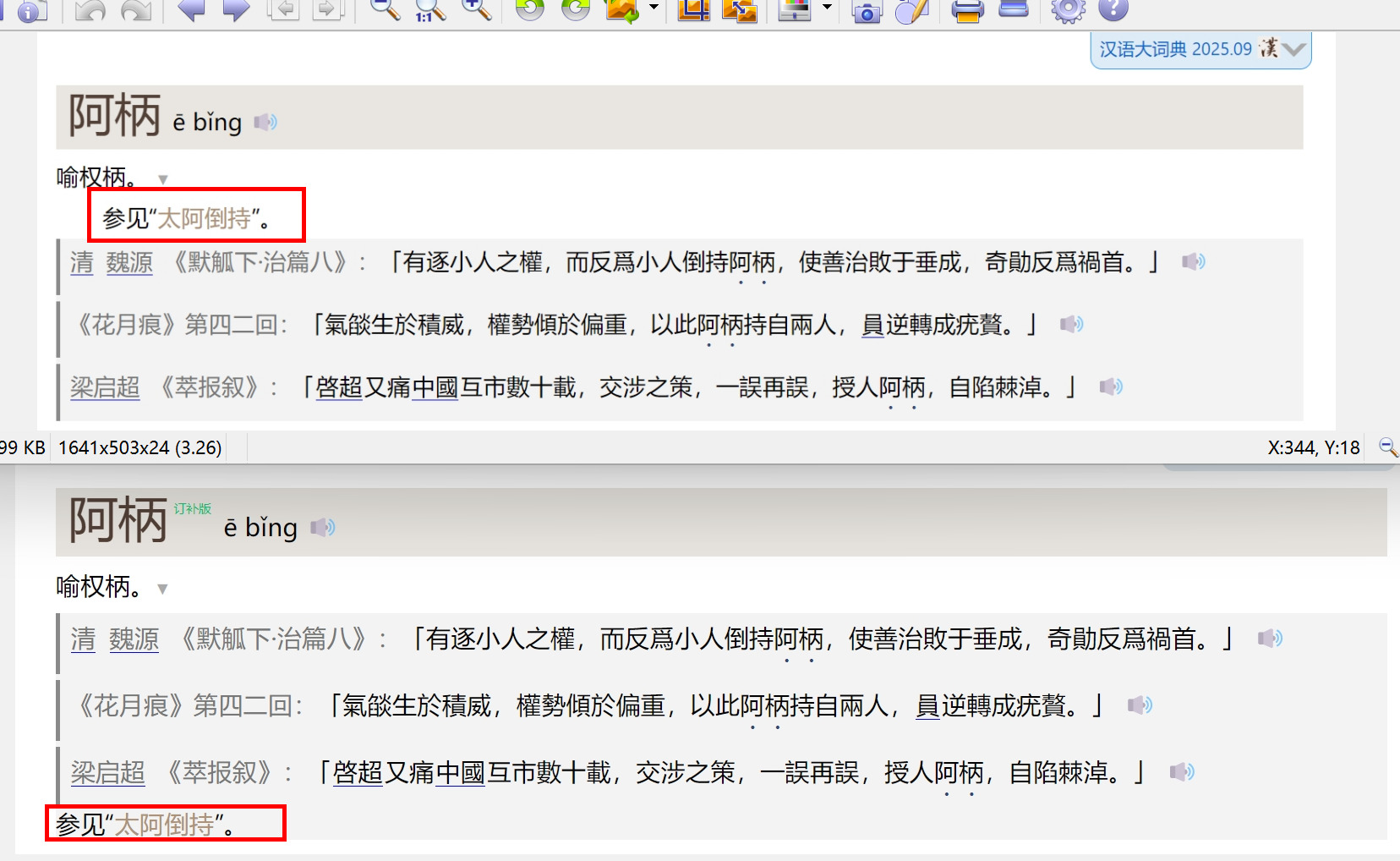
引用后面的喇叭是为音频准备的吗?
对的,tts播放发音和例证,之前是未开启的,后面改默认启用了